
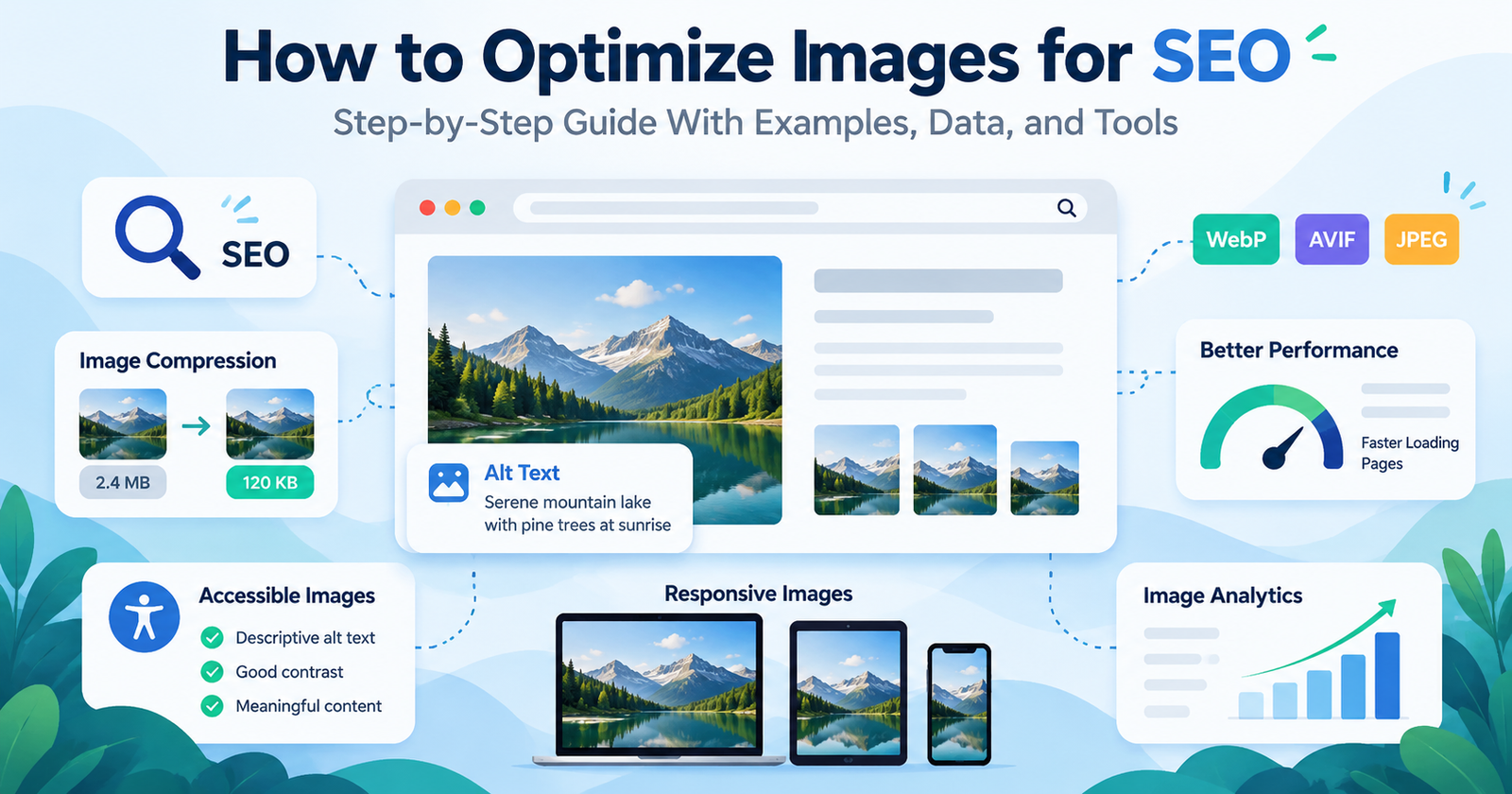
Image SEO improves how search engines discover, understand, and index website images while helping browsers load them efficiently. Optimize images by writing descriptive alt text, choosing appropriate formats, reducing file size, serving responsive dimensions, and maintaining crawlable image URLs.
Image optimization involves more than making files smaller. A compressed image can still perform poorly in Google Images when the landing page lacks relevant context. Likewise, an accurately described image can slow a website when its dimensions, file size, or loading priority are unsuitable.
Google’s Image SEO Best Practices identify two main requirements: helping Google discover and index images, and optimizing the pages where those images appear.
This guide explains how to address both requirements, verify the results, and decide whether manual image compression or an automated optimization tool is appropriate.
An Image SEO Diagnostic Framework: Eligibility, Meaning, and Delivery
An image can fail to contribute to a page in three different ways. Separating them prevents an optimization task from becoming a collection of unrelated tweaks.
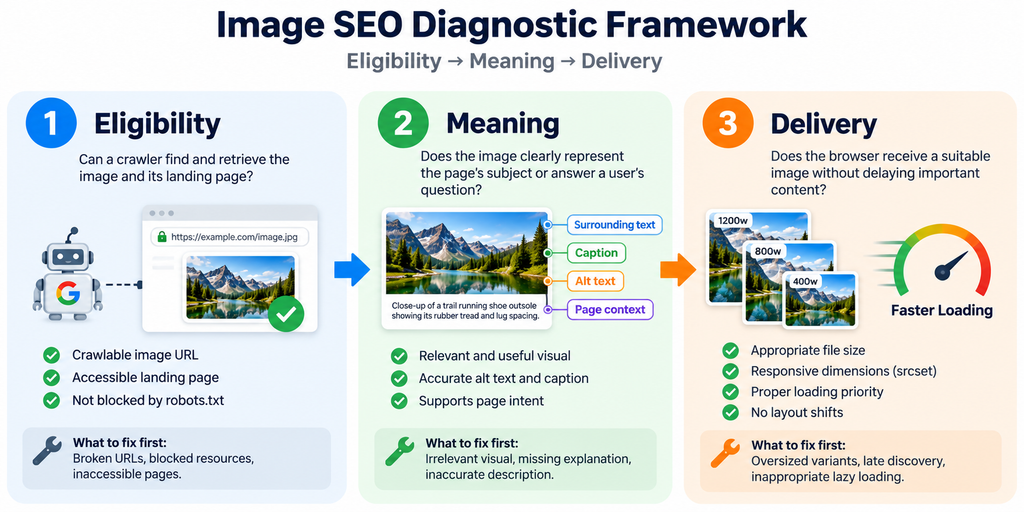
| Diagnostic layer | Question to answer | Evidence to inspect | What to fix first |
| Eligibility | Can a crawler find and retrieve the image and its landing page? | Rendered <img> source, image response status, robots rules, page indexability | Broken URLs, blocked resources, inaccessible pages |
| Meaning | Does the image clearly represent the page’s subject or answer a user’s question? | Visible image, adjacent copy, caption, alt text, page intent | Irrelevant visual, missing explanation, inaccurate description |
| Delivery | Does the browser receive a suitable image without delaying important content? | Network transfer size, selected srcset candidate, LCP element, layout shifts | Oversized variants, late discovery, inappropriate lazy loading |
The order is intentional, not a ranking formula. A smaller file cannot fix an inaccessible image. Better alt text cannot compensate for a photograph unrelated to the page. Conversely, an indexable and relevant image may still need delivery improvements for visitors.
For instance, if a product photo is missing from Google Images while it loads quickly for visitors, start with eligibility and meaning rather than immediately installing a compression plugin. If the image is visible in search but a product page loads slowly, investigate delivery instead.
This three-layer framework is an editorial diagnostic model derived from the different functions of image discovery, contextual interpretation, and browser loading. It is not a Google-issued scoring system.
What Is Image SEO?
Image SEO is the process of optimizing visual assets for search discoverability, contextual relevance, accessibility, and website performance.
Visual assets include photographs, product images, screenshots, diagrams, and infographics. Each image contains attributes such as its filename, format, pixel dimensions, alternative text, and source URL.
Google uses information from the image and its surrounding content to understand the subject. This includes page text, image captions, titles, and alt text.
However, image SEO and image compression serve different purposes.
Image SEO concerns search visibility and interpretation. Image compression concerns the efficient encoding and transfer of visual data.
Compression is one component of image SEO, not its complete definition.
How Does Google Discover Website Images?
Google discovers images through supported HTML image references and other discovery mechanisms, including image sitemaps.
The standard HTML <img> element provides an image source using the src attribute.
<img
src=”/images/black-trail-running-shoes.webp”
alt=”Black trail running shoes with textured outsoles”
>
Google supports images referenced through <img> elements, including those within <picture> elements.
Google’s documentation also states that it does not index images referenced exclusively through CSS background-image declarations.
For important editorial photographs or product visuals, use HTML image elements.
Source: Google Image SEO Best Practices.
How Do You Choose Images That Are Relevant to Search Intent?
Select images that directly explain the page’s main topic, demonstrate a feature, or provide useful information that supports the surrounding text.
Search intent determines what a visitor expects to find.
For example, a page about trail running shoe traction should provide visual information about outsole construction, tread patterns, and relevant product characteristics.
A close-up showing outsole lugs communicates more specific information about tread construction than an unrelated photograph of a runner.
The relationship between the image and its subject can be described through a semantic hierarchy.
| Semantic level | Entity | Relationship |
| Parent category | Footwear | Broad product class |
| Subcategory | Athletic footwear | Type of footwear |
| Specific category | Trail running shoes | Type of athletic footwear |
| Component | Outsole | Part of the shoe |
| Component attribute | Lug depth | Measurable tread property |
| Functional relationship | Traction | Performance characteristic affected by tread and terrain |
These relationships help writers describe an image accurately without repeating the same keyword.
Does Surrounding Content Affect Image SEO?
Yes. Google uses nearby text, headings, captions, and the broader page context to help interpret image content.
For example, an image showing a running shoe outsole belongs near an explanation of tread design and traction.
A useful caption would be:
Close-up of a trail running shoe outsole showing its rubber tread and lug spacing.
This caption communicates the visible content and connects it to the surrounding discussion.
Google recommends placing images near relevant text and on pages relevant to the image’s subject.
Source: Google Image SEO Best Practices.
How Should You Name Images for SEO?
Use concise, descriptive filenames that identify the visible subject. Separate words with hyphens and avoid unrelated keywords.
Google states that image filenames provide light clues about image content.
A filename should therefore identify the image rather than act as a collection of search terms.
| Poor filename | Descriptive filename |
| IMG1234.jpg | black-running-shoes.jpg |
| photo-final.png | office-chair-lumbar-support.png |
| image001.webp | solar-panel-roof-installation.webp |
A filename such as office-chair-lumbar-support.webp identifies the object and the feature illustrated.
A filename such as best-cheap-office-chair-buy-online.webp introduces commercial phrases that do not necessarily describe the image.
Do Image Filenames Need Keywords?
Include a keyword only when it accurately describes the image.
For instance, black-ergonomic-office-chair.webp is appropriate when the photograph shows that product.
An image showing only an armrest adjustment mechanism should use a more specific description, such as office-chair-adjustable-armrest.webp.
The page establishes the broad topic. The filename identifies the individual visual resource.
How Do You Write SEO-Friendly Alt Text?
Write alt text that communicates the meaningful information or function of the image. Use descriptive terms naturally and omit unnecessary keyword repetition.
Alt text is the text alternative associated with an image.
It helps assistive technologies communicate visual information and provides search engines with additional context.
The W3C Web Accessibility Initiative distinguishes images according to their purpose, including informative, functional, decorative, and complex images.
That distinction determines what the alternative text should communicate.
Source: W3C Images Tutorial.
What Is Good Alt Text for a Product Image?
Good product alt text identifies the product and its relevant visible characteristics.
Consider an image showing a black trail running shoe with a textured outsole.
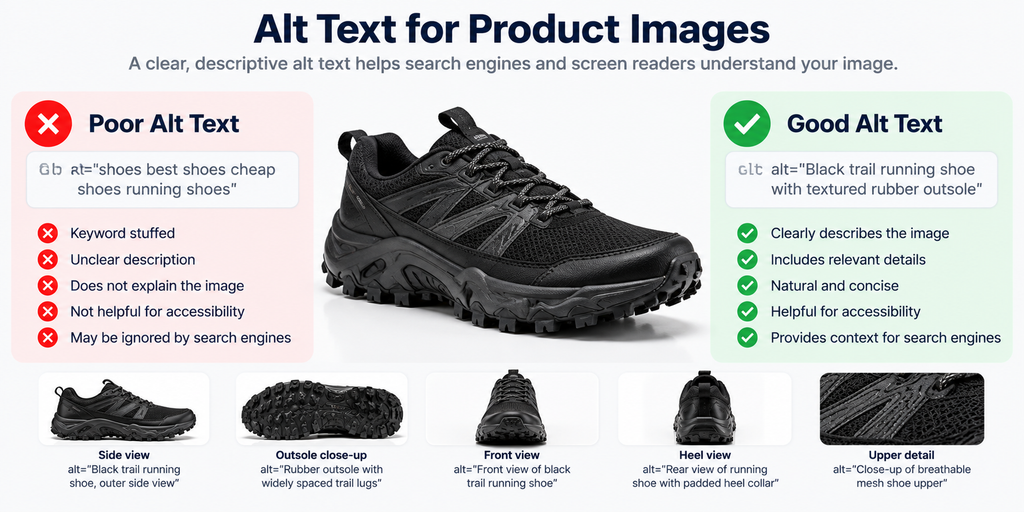
Poor example:
alt=”shoes best shoes cheap shoes running shoes”
Better example:
alt=”Black trail running shoe with textured rubber outsole”
The second description provides a product category, color, and physical characteristic.
It avoids unsupported claims about durability, comfort, price, or performance.
Should Every Image Have Different Alt Text?
Images showing different information should have descriptions that reflect those differences.
For a product gallery, the description should correspond to the view or feature shown.
| Product image | Alt text |
| Side view | Black trail running shoe, outer side view |
| Outsole close-up | Rubber outsole with widely spaced trail lugs |
| Upper detail | Close-up of breathable mesh shoe upper |
| Heel view | Rear view of running shoe with padded heel collar |
These descriptions are illustrative and should only be used when the photographed product has the stated characteristics.
Should Decorative Images Have Alt Text?
Purely decorative images generally should use an empty alt attribute: alt=””.
<img
src=”/images/decorative-divider.svg”
alt=””
>
An empty alternative allows screen readers to skip the decorative image.
Functional images require different treatment. For example, an image used as a search button needs an accessible name that communicates the action.
What Is the Ideal Alt Text Length?
There is no universal Google requirement for alt text to contain a fixed number of characters.
Use enough words to communicate the image’s purpose without unnecessary detail.
A simple product image may need one short sentence or phrase. A scientific chart may require additional supporting text to explain the data.
Prioritize meaning over arbitrary length limits.
Which Image Format Is Best for SEO?
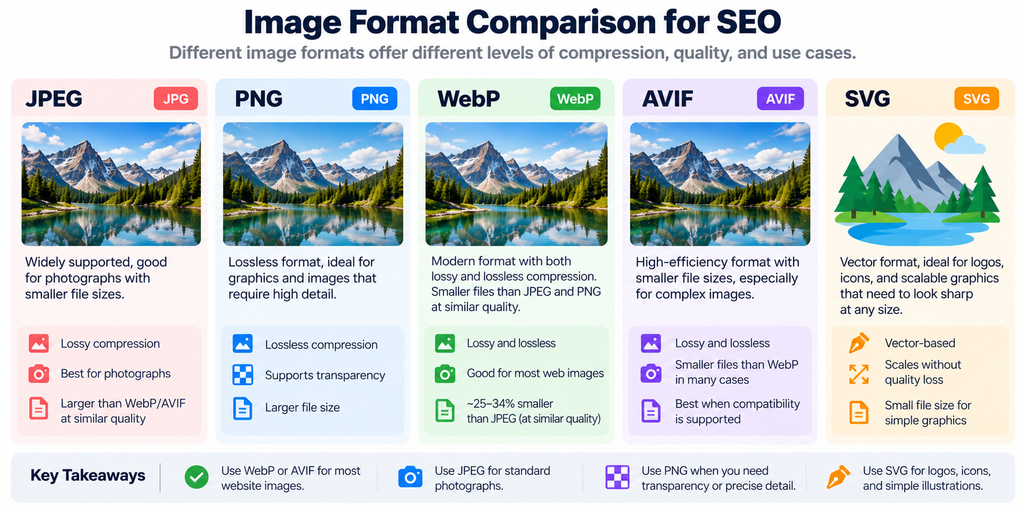
WebP and AVIF are suitable for many website images because they offer efficient compression, but the best format depends on visual quality, file size, transparency, and compatibility.
Raster image formats represent pixel-based content. Examples include JPEG, PNG, WebP, and AVIF.
Vector formats, including SVG, describe graphical shapes and paths.
The appropriate format depends on the image’s properties.
WebP vs AVIF vs JPEG vs PNG vs SVG
| Format | Compression characteristics | Appropriate use |
| WebP | Lossy and lossless | Product photographs and general web imagery |
| AVIF | High-efficiency compression | Photographs where encoding and compatibility requirements are met |
| JPEG | Lossy | Standard photographic content |
| PNG | Lossless | Screenshots and graphics requiring precise detail |
| SVG | Vector-based | Logos, icons, and scalable diagrams |
How Much Smaller Is WebP Than JPEG?
Google reports that lossy WebP images were approximately 25–34% smaller than comparable JPEG images at equivalent SSIM quality in its published comparisons.
The same documentation reports that lossless WebP images were approximately 26% smaller than PNG images.
SSIM, or Structural Similarity Index, is a metric used to compare structural visual similarity.
These results describe Google’s published format comparisons. They are not guaranteed savings for every image.
Source: Google WebP Documentation.
Is AVIF Better Than WebP for SEO?
AVIF can deliver smaller files for some images, but neither format has a universal SEO ranking advantage.
Compression results depend on content complexity, encoder settings, transparency, and acceptable visual quality.
The appropriate comparison measures transferred bytes and visual fidelity at the intended display size.
A format should not be selected solely because it is newer.
How Do You Compress Images Without Losing Quality?
Reduce file size by adjusting dimensions, encoding format, and compression quality while preserving the visual information the image needs to communicate.
Image compression can be lossless or lossy.
Lossless compression retains the original information through reversible encoding.
Lossy compression removes selected information to reduce file size.
For photographs, moderate lossy compression can produce significant transfer savings without obvious visual degradation.
For screenshots containing small text, aggressive lossy compression may introduce noticeable artifacts.
What Is an Example of Image Compression Savings?
Consider a hypothetical 600 KB original image.
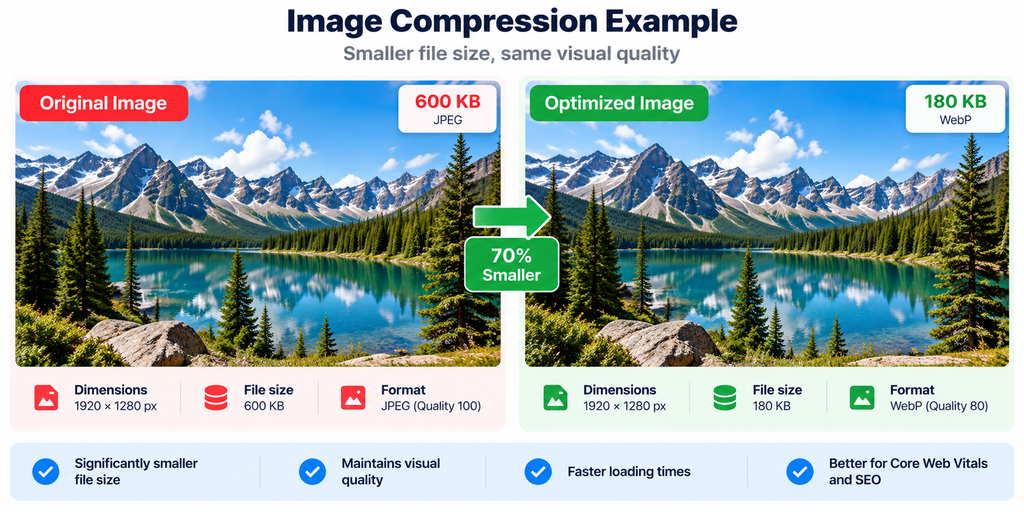
| Image version | File size | Reduction |
| Original JPEG | 600 KB | 0% |
| Compressed WebP | 180 KB | 70% |
| Compressed AVIF | 135 KB | 77.5% |
The percentages are calculated examples, not experimental results.
The calculation is:
File-size reduction (%) = (Original size − Optimized size) ÷ Original size × 100
A 70% reduction decreases a 600 KB resource to 180 KB. It does not establish that page loading time or search rankings will improve by the same percentage.
What Is the Ideal Image File Size for SEO?
Google does not prescribe a universal KB limit for website images.
The appropriate file size depends on intrinsic dimensions, rendered dimensions, image complexity, and display requirements.
A small icon and a high-resolution product photograph require different amounts of visual information.
The correct objective is to minimize unnecessary transfer size without removing useful detail.
How Do Responsive Images Improve Website Performance?
Responsive images allow browsers to select an appropriately sized resource based on layout width, viewport conditions, and device characteristics.
An image can have intrinsic dimensions larger than its displayed dimensions.
For example, a 2400-pixel-wide image may appear inside a 600-CSS-pixel content column.
Delivering the largest resource to every device can transfer unnecessary data.
The HTML srcset attribute provides alternative image resources. The sizes attribute describes their expected rendered width.
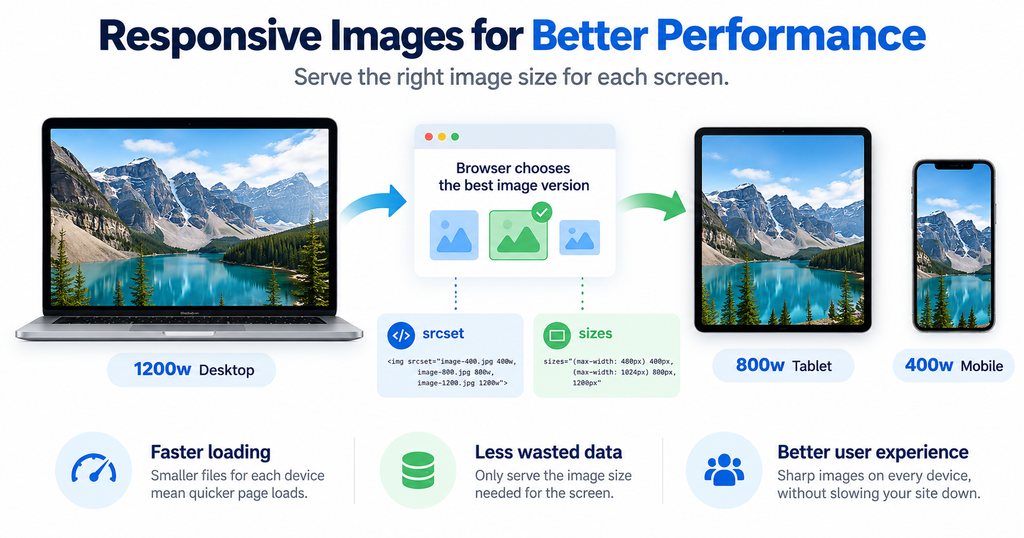
<img
src=”/images/trail-shoe-800.webp”
srcset=”
/images/trail-shoe-400.webp 400w,
/images/trail-shoe-800.webp 800w,
/images/trail-shoe-1200.webp 1200w
“
sizes=”(max-width: 600px) 100vw, 800px”
width=”1200″
height=”800″
alt=”Black trail running shoe with textured outsole”
>
The browser uses the available source candidates and relevant display information to select an image.
The width and height attributes also communicate the intrinsic aspect ratio.
Why Should Images Have Width and Height Attributes?
Explicit dimensions help browsers reserve layout space before the image finishes loading.
An image without reserved space can push surrounding content downward when it loads.
That unexpected movement contributes to Cumulative Layout Shift.
Using dimensions that reflect the image’s intrinsic aspect ratio helps prevent this behavior.
How Do Images Affect Core Web Vitals?
Images can affect Core Web Vitals through download timing, resource priority, rendering behavior, and layout stability.
Google’s Core Web Vitals include Largest Contentful Paint, Interaction to Next Paint, and Cumulative Layout Shift.
Image-specific optimizations most directly influence loading performance and visual stability.
What Are Google’s Core Web Vitals Thresholds?
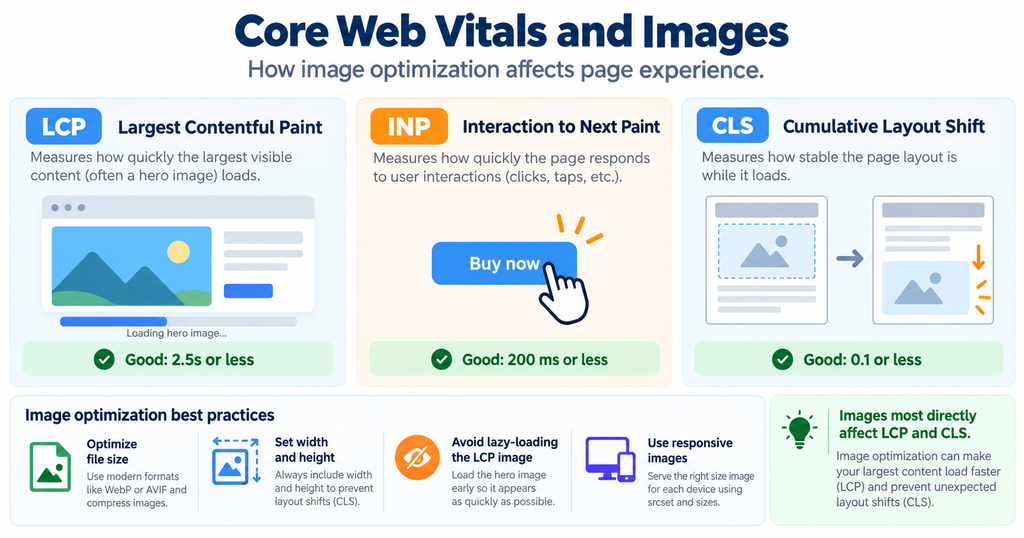
| Metric | What it measures | Good threshold |
| LCP | Loading performance | 2.5 seconds or less |
| INP | Interaction responsiveness | 200 milliseconds or less |
| CLS | Visual stability | 0.1 or less |
Google evaluates these experience thresholds using the 75th percentile of relevant real-user visits.
Source: Google Core Web Vitals Documentation.
How Do You Optimize the LCP Image?
Make the likely LCP image discoverable early, avoid lazy loading it, and consider an appropriate resource-priority hint.
A prominent hero image or product photograph may become the Largest Contentful Paint element.
Its loading can be delayed by a slow server response, late resource discovery, large transfer size, or rendering delays.
For an important hero image:
<img
src=”/images/trail-running-hero.webp”
alt=”Runner wearing trail shoes on rocky terrain”
width=”1200″
height=”800″
fetchpriority=”high”
>
The fetchpriority=”high” attribute provides a request-priority hint to the browser.
It should be applied selectively.
Should You Lazy-Load Images?
Lazy-load offscreen images when appropriate, but do not lazy-load images that are immediately needed for initial page rendering.
<img
src=”/images/shoe-outsole.webp”
alt=”Trail running shoe outsole showing rubber tread”
width=”800″
height=”600″
loading=”lazy”
>
This example is appropriate for an image below the initial viewport.
Lazy loading can reduce unnecessary initial resource requests. Applied to the LCP image, however, it can delay important content.
The correct behavior should be confirmed using browser performance diagnostics.
How Do You Help Google Index Website Images?
Provide crawlable image URLs through supported HTML markup and ensure that search engines can access the landing page and image resources.
Image indexing requires more than writing an alt attribute.
Google must first discover the image and obtain the resource.
Technical problems can interrupt that process.
Examples include broken URLs, blocked resources, inaccessible CDN endpoints, and image references that crawlers cannot discover.
Why Are Images Not Showing in Google Images?
Common causes include crawl restrictions, inaccessible image URLs, poor page discoverability, and insufficient contextual relevance.
The diagnosis should begin with the image URL.
Confirm that the resource returns a successful response and does not require authentication.
Next, check the landing page’s indexability and the HTML image reference.
Then review relevant page content, captions, and image descriptions.
Even when these requirements are satisfied, Google does not guarantee indexing or a particular search placement.
Do Image Sitemaps Improve Rankings?
Image sitemaps support image discovery but do not directly guarantee ranking improvements.
An image sitemap associates a page URL with an image resource.
<?xml version=”1.0″ encoding=”UTF-8″?>
<urlset
xmlns=”http://www.sitemaps.org/schemas/sitemap/0.9″
xmlns:image=”http://www.google.com/schemas/sitemap-image/1.1″>
<url>
<loc>https://example.com/trail-shoes/</loc>
<image:image>
<image:loc>https://example.com/images/trail-shoes.webp</image:loc>
</image:image>
</url>
</urlset>
Google supports image information within existing XML sitemaps or separate image sitemaps.
This can be useful when important image URLs are otherwise difficult to discover.
Source: Google Image Sitemaps Documentation.
Does Image Structured Data Help SEO?
Structured data can describe the relationship between images and supported content types, but valid markup does not guarantee rankings or rich results.
Schema.org provides machine-readable vocabularies for content such as Product, Recipe, and Article.
For an e-commerce page, the image property can associate a Product entity with its product photograph.
For an editorial article, image properties can identify relevant visual content.
Structured data should describe the actual content visible on the landing page.
There is no requirement to create an independent ImageObject declaration for every decorative or informational image.
Source: Google Structured Data Introduction.
How Do You Optimize Images in WordPress and Shopify?
Start with the platform’s existing image delivery capabilities, then introduce optimization software only when it solves a specific requirement.
WordPress and Shopify manage image uploads, transformations, and presentation through different systems.
A plugin or app may provide compression, bulk image processing, metadata management, or automated delivery.
Before installing additional software, inspect what the site already provides.
What Should You Check in WordPress?
WordPress can generate image-size variants and responsive image markup.
Check the theme’s output, image dimensions, compression behavior, and media-library workflow.
A plugin becomes useful when it provides missing features or processes existing image libraries more efficiently.
What Should You Check in Shopify?
Shopify stores often depend on multiple product photographs showing different views and attributes.
Inspect how the storefront delivers product-image sizes and how it handles image descriptions.
Preserve important product details during compression.
Additional software should address a verified limitation, such as bulk management or a specialized asset workflow.
Which Image Optimization Tool Should You Choose?
Choose an image optimization tool according to workload, supported formats, quality requirements, platform integration, and delivery needs.
Manual image compression is appropriate when the number of images is manageable.
Automated processing becomes more relevant when new content is uploaded frequently or a large image library requires repeated transformation.
Manual Compression vs Plugin vs Image CDN
| Requirement | Manual tool | CMS plugin | Image CDN |
| Compress individual images | Suitable | Suitable | Usually supported |
| Process large image libraries | Labor-intensive | Often supported | Depends on service |
| Automate new uploads | Usually manual | Often supported | Integration-dependent |
| Deliver responsive variants | Requires preparation | Platform-dependent | Often supported |
| Centralize image transformations | Limited | Platform-dependent | Core capability for many services |
| Main consideration | Editorial time | Plugin compatibility | Integration and recurring cost |
When Should You Use Squoosh?
Use Squoosh when you need direct control over image compression settings and want to inspect image quality before publishing.
It is suitable for occasional image preparation and format comparisons.
When Should You Use a WordPress Compression Plugin?
Use an image optimization plugin when manual compression becomes repetitive or existing uploads require bulk processing.
Evaluate conversion support, original-file retention, processing limits, and compatibility before choosing a plan.
For detailed comparisons, assess products such as ShortPixel and Imagify using their current documentation and pricing.
When Should You Use an Image CDN?
Use an image CDN when the website requires managed image transformations, caching, and delivery across multiple devices or locations.
CDN capabilities vary by provider.
A CDN can improve image delivery operations, but it does not automatically correct poor alt text, irrelevant content, or search-engine crawling restrictions.
How Do You Measure Image SEO Performance?
Measure image search visibility with Google Search Console and loading performance with PageSpeed Insights or real-user monitoring.
These metrics describe different outcomes.
Search Console can show whether images generate search impressions and clicks.
Performance tools can show whether image resources contribute to loading delays or layout shifts.
Neither measurement should be substituted for the other.
Which Metrics Should You Track?
| Metric | Measurement purpose | Tool |
| Image search impressions | Search visibility | Google Search Console |
| Image search clicks | Search traffic | Google Search Console |
| Image click-through rate | Search engagement | Google Search Console |
| LCP | Main content loading | PageSpeed Insights |
| CLS | Visual stability | PageSpeed Insights |
| Image transfer size | Download efficiency | Browser DevTools |
For Search Console, select the Image search type in the Performance report.
When evaluating optimization results, compare relevant periods and account for changes in search demand, page content, and indexing.
What Does a Successful Image Optimization Test Look Like?
A controlled audit records the starting conditions, optimization changes, and subsequent measurements.
For example:
| Measurement | Before | After |
| Image file size | 600 KB | 180 KB |
| File-size reduction | 0% | 70% |
| LCP | 3.4 seconds | 2.6 seconds |
| CLS | 0.18 | 0.06 |
These numbers are hypothetical examples demonstrating measurement and interpretation, not the results of an actual website experiment.
The file-size reduction is directly calculable.
The LCP and CLS differences require actual testing to establish whether similar improvements occur on a real website.
What Is the Correct Image SEO Workflow?
The correct workflow is to establish image relevance, optimize the file, implement accessible HTML, verify crawlability, and measure performance.
Use this sequence when preparing important website images:
- Select an image that supports the page’s purpose.
- Give it a descriptive filename.
- Choose an appropriate format and resize it.
- Compress the image while checking visual quality.
- Write accurate alt text.
- Implement responsive image attributes and dimensions.
- Configure suitable loading priority.
- Verify crawler access and image discovery.
- Measure loading performance and image search visibility.
An optimization should address an identifiable problem.
Changing the file format will not fix an inaccessible URL. Adding keywords to alt text will not resolve a slow server. Installing a CDN will not automatically improve the relevance of a photograph.
Diagnose the underlying issue before selecting a technical solution.
Frequently Asked Questions
Does Alt Text Improve Image SEO?
Alt text helps search engines understand image content and supports accessibility, but it does not guarantee higher rankings.
Does Google Prefer WebP Images?
Google supports WebP and other image formats, but its official guidance does not establish a universal ranking advantage for WebP.
What Is the Best Image Size for SEO?
The best size is the smallest efficiently encoded image that preserves the detail required at its intended rendered dimensions.
Is Lazy Loading Good for SEO?
Lazy loading can reduce unnecessary initial downloads, but important above-the-fold images should generally load promptly.
Are Image Sitemaps Required?
Image sitemaps are optional and particularly useful for exposing important images that search engines might otherwise miss.
Can Image Compression Improve PageSpeed Scores?
Compression can reduce transfer size and improve loading metrics when image downloads contribute to the performance problem.
Does Image SEO Increase Organic Traffic?
Image SEO can improve image discoverability and relevance, but additional traffic depends on indexing, search demand, competition, and search-result presentation.
Should You Pay for Image Optimization Software?
Paid software is justified when its automation, bulk processing, or delivery features solve a measurable problem more efficiently than existing capabilities.
Final Recommendation
Effective image SEO combines search discoverability, accessibility, contextual relevance, and website performance.
Start with images that matter most to your website. Use descriptive filenames and accurate alt text, select suitable formats such as WebP or AVIF, compress images without sacrificing important details, and serve responsive dimensions.
Ensure important images are accessible to search engines and use appropriate loading priorities to support Core Web Vitals.
Finally, monitor results using Google Search Console, PageSpeed Insights, and browser performance tools.
The goal is not simply to create smaller image files. It is to deliver relevant, accessible, and efficiently loaded images that improve the user experience while supporting organic search visibility.


